
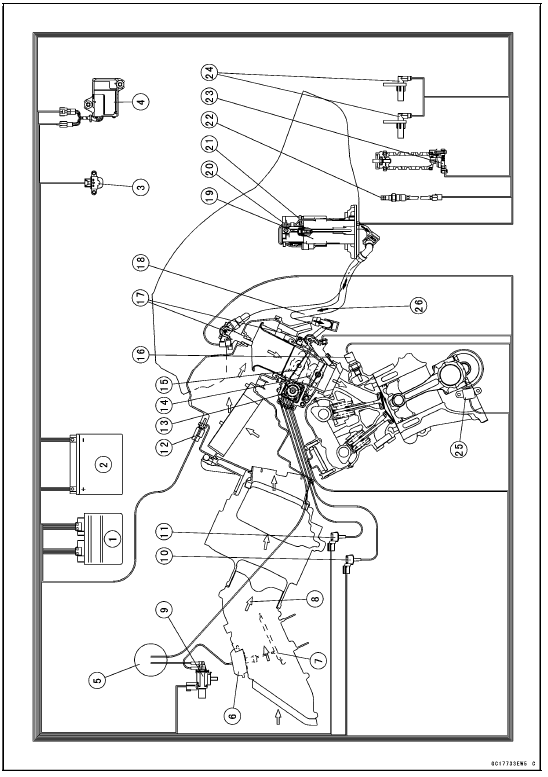
1. ECU
2. Battery
3. Vehicle-down Sensor
4. Exhaust Butterfly Valve Actuator
5. Vacuum Chamber (Other than US, CA and CAL Models)
6. Air Intake Valve Actuator (Other than US, CA and CAL Models)
7. Air Intake Valve (Other than US, CA and CAL Models)
8. Air Flow
9. Air Intake Solenoid Valve (Other than US, CA and CAL Models)
10. Intake Air Pressure Sensor #2
11. Intake Air Pressure Sensor #1
12. Intake Air Temperature Sensor
13. Subthrottle Valve Actuator
14. Main Throttle Sensor
15. Subthrottle Sensor
16. Water Temperature Sensor
17. Fuel Injectors
18. Primary Fuel Hose
19. Fuel Pump
20. Fuel Filter
21. Pressure Regulator
22. Oxygen Sensor (Equipped Models)
23. Gear Position Switch
24. Wheel Rotation Sensors
25. Crankshaft Sensor
26. Fuel Flow
 Exploded View
 DFI System Wiring Diagram
Self-Diagnosis Outline
The self-diagnosis system is monitoring the following
mechanisms.
DFI System and Ignition System
S-KTRC System
Immobilizer System (Equipped Models)
KIBS and ABS (Equipped Models)
ESD (Electronic Steering Damper) System
(ZX1000JD/KD)
The following warning indicator lights (LED) are used for ...
Caliper Fluid Seal Damage
The fluid seal (piston seal) [A] is placed around the piston
to maintain clearance between the pad and the disc. If
the seal is in a poor condition, it could lead the pad to wear
excessively or the brake to drag, which may cause the temperature
of the discs or the brake fluid to increase.
Re ...
Radiator and Cooling Fan
Check the radiator fins for obstruction
by insects or mud. Clean off
any obstructions with a stream of
low-pressure water.
WARNINGThe cooling fan spins at high
speed and can cause serious
injuries. Keep your hands and
clothing away from the cooling
fan blades at all times.
...