
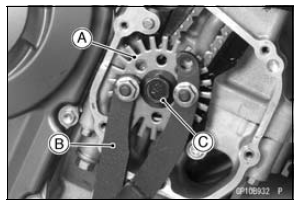
Holding the timing rotor with the flywheel & pulley holder [B] and unscrew the bolt [C].
Special Tool - Flywheel & Pulley Holder: 57001-1605
 Crankshaft Sensor Peak Voltage Inspection
 Timing Rotor Installation
Overview
S-KTRC is a highly sophisticated system based on MotoGP racing technology.
Unlike the KTRC
system used on the GTR1400 ABS (Concours 14 ABS in N. America), which is
designed to offer rider
reassurance when traversing slippery surfaces, S-KTRC, is designed to maximize
forward motion,
allowing ...
Parking
WARNINGOperating or parking the vehicle
near flammable materials can
cause a fire, and can result in
property damage or severe personal
injury.
Do not idle or park your vehicle
in an area where tall or dry vegetation,
or other flammable materials
could come into cont ...
Rear Wheel Rotation Sensor Signal Abnormal (Service Code b 44)
Measure the air gap between the rear wheel rotation sensor
and sensor rotor.
Thickness Gauge [A]
Air Gap
Standard: 0.4 1.6 mm (0.02
0.06 in.)
If the measurement is not the standard, check each part
for deformation and looseness and correct accordingly.
If the measurement is the sta ...